
Give back to customers who buy from you.
RewardsPro is an app for Shopify stores. It adds cashback to your customers' Shopify store credit when an order is paid, with VIP tiers by spend and a widget on your storefront. No one earns cashback without a paid order.
RewardsPro is free, and the cashback is store credit in your own shop, so you fund the cashback you give.
View RewardsPro on the Shopify App Store
Made by Cambridge TCG Limited, a UK company in London.
How it works
-
Set your tiers and switch cashback on
Start with a base cashback rate, a whole percent from 0 to 100. It becomes your lowest tier, Everyone, which starts at a spend of 0. Add tiers by spend, each with its own cashback rate. So a customer who has spent more with you can be in a tier with a higher rate, if you set one. Loyal customers move between tiers as their spend changes, unless you lock them to a tier.
Spend is counted over the last 12 months or over all time, as you choose, from the orders RewardsPro has recorded: those since install, and past orders from up to 12 months before it. Past orders earn no cashback. Then switch cashback on, and turn on the widget in your theme editor.
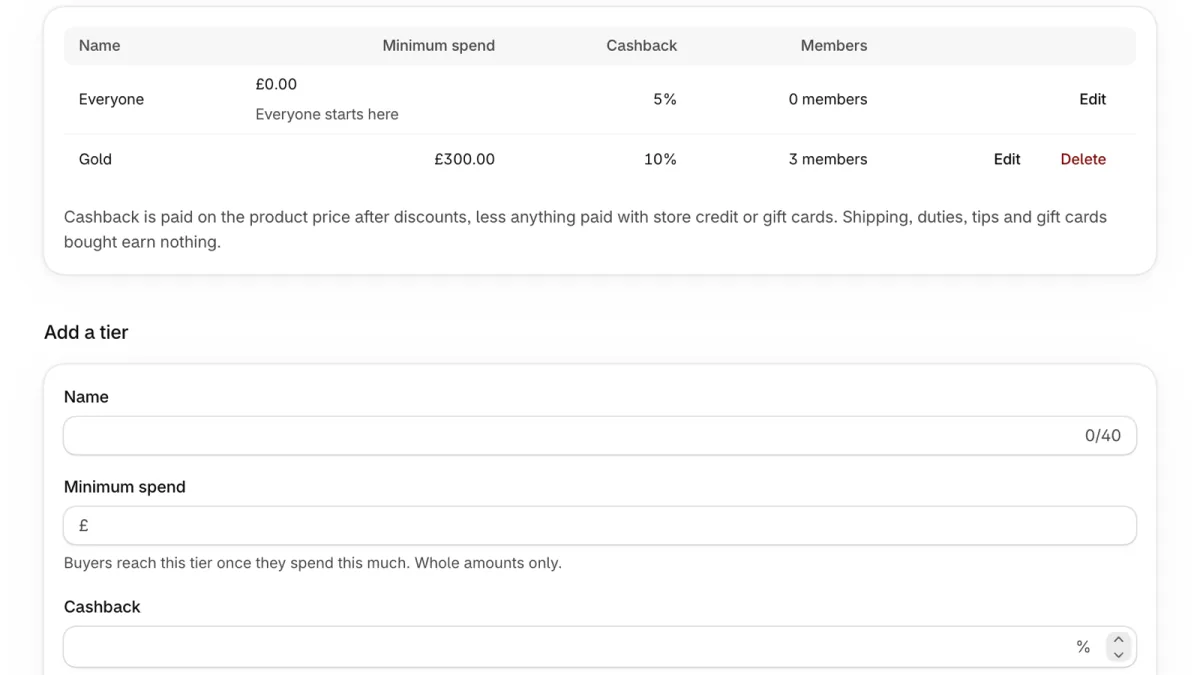
The Tiers page, on a development store with invented data. -
A paid order earns cashback as store credit
When an order is paid, RewardsPro adds cashback to the customer's Shopify store credit, at the rate of the tier they were in before the order. It doesn't wait for the order to be fulfilled. Where your store takes payment later, at fulfilment for example, cashback follows that payment.
Cashback is paid on the product price after discounts, less any part of the order paid with store credit or gift cards. Shipping, and gift cards bought as products, earn nothing. Nor do orders with no customer attached, Shopify's test orders, or orders RewardsPro records while cashback is off. Every order that earns nothing is listed on the help page.
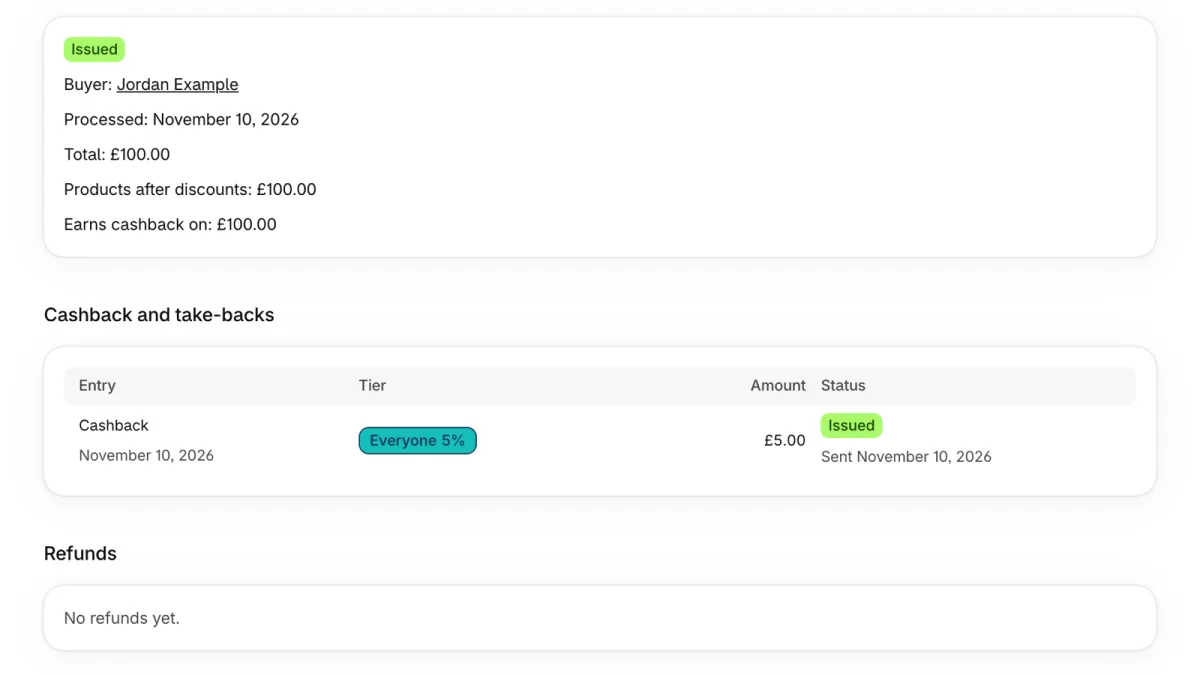
An order's page. The buyer is an invented customer on a development store. -
Customers spend it at checkout
Customers can spend store credit at checkout when signed in with Shopify's new customer accounts or with Shop Pay; it isn't available for legacy customer accounts. Shopify applies the full store-credit balance at checkout; customers can't choose part of it.
Both are Shopify's rules: Shopify Help Center, "Store credit", as read on 7 November 2026.
While cashback is on, the widget shows guests a sign-in prompt, or your own message and link, with your base rate when it is above 0%. Signed-in customers see their tier, its cashback rate while cashback is on, their store credit when Shopify returns it, and how far they are from the next tier, when there is one they can reach. When the signed-in view stays hidden is on the help page.
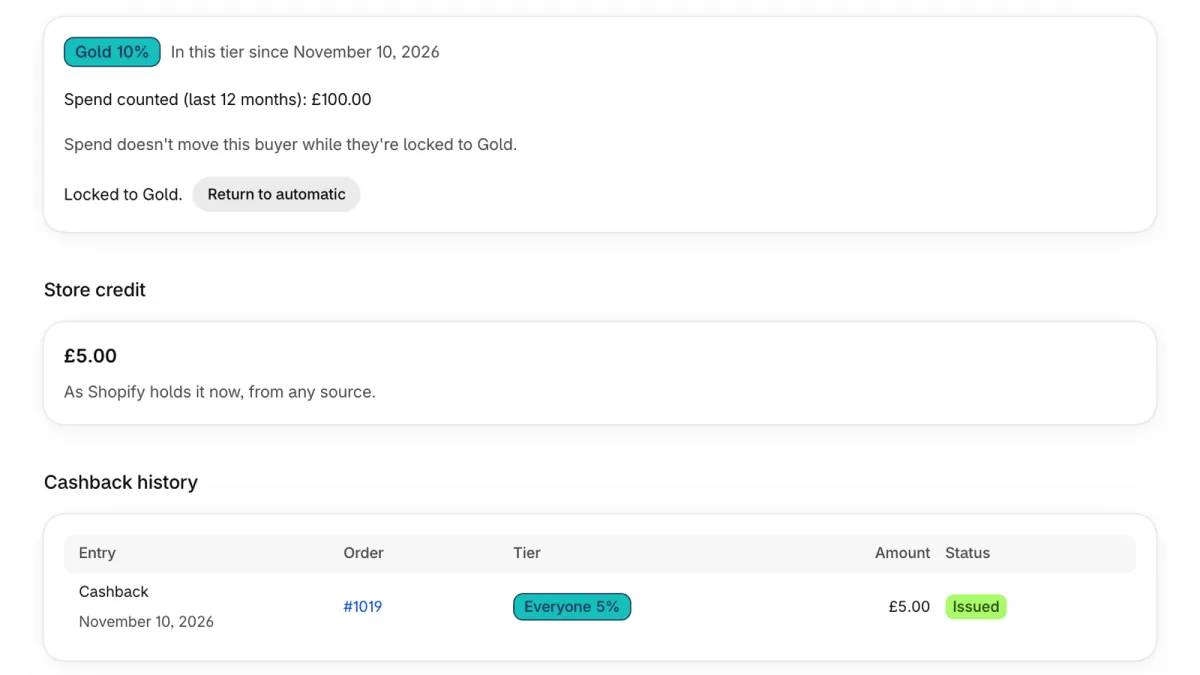
A customer's page in the app, for the same invented customer, locked to a tier. -
A refund takes its share back
When items are refunded, RewardsPro takes back their share of the cashback, up to the store credit the customer still holds in the order's currency. A refund of shipping alone takes nothing back. If the customer has already spent the credit, RewardsPro takes what is left and doesn't chase the rest.
Where a refund takes back more, or nothing:
- On a store whose prices exclude tax, a refund of money alone, with no items, takes back more than its share, by the tax rate.
- A refund too large for RewardsPro to read takes nothing back, and neither does any later refund of that order. The help page gives the sizes.
- After a customer's data is erased at their request, refunds of their orders take nothing back.
- These rules are for orders as they were paid, not for items an edit or an exchange added after payment.
What it costs
RewardsPro is free for every store that installs it, and no paid plans are offered. The cashback is store credit in your own shop, so you fund the cashback you give.
Shopify's rule
For Shopify stores created on or after 12 May 2025, Shopify charges third-party transaction fees on the part of an order paid with store credit.
Sources: Shopify Help Center, "Store credit" and "Third-party transaction fees", as read on 7 November 2026.
What it doesn't do
- Each tier has one cashback rate, with no setting to exclude products, collections or sales channels.
- Shopify doesn't let store credit pay subscription renewals.
- RewardsPro sends no email. One setting, off by default, asks Shopify to send its own email when a customer earns store credit.
- The widget's text is in English.
- Uninstalling takes back none of the store credit your customers already have.
The help page covers setup, the widget and the app's limits in more detail.
Next step
Read the listing and install RewardsPro from the Shopify App Store.
View RewardsPro on the Shopify App Store
Before you install, the help page explains setup step by step, and the privacy policy says what the app stores.
Contact
Write to us at contact@rewardspro.io.
Existing agreements
If your store has an existing paid agreement for RewardsPro, write to us about its records or about cancelling it.
Existing account support: contact@rewardspro.io